The Activity Hit Rate metric shows the percentage of activities that both start and finish on time within an update window. When you upload schedule updates, SmartPM compares actual performance over that window against the planned dates at the start of the window.
SmartPM uses the SS/SF (Start-to-Start / Start-to-Finish) Spanning Window method to capture both starts and finishes within the reporting period. A higher Hit Rate indicates stronger schedule reliability and predictability.
You can also set a Hit Rate Goal for each update (default is 100%).
How Activity Hit Rate Affects the Schedule
- Indicates how reliably the schedule is being planned.
- Helps you understand how often your plan is hitting its targets.
- Provides insight into planning vs. actual performance discrepancies.
- Supports continuous improvement by highlighting patterns of schedule misses or delays.
How the Hit Rate Is Calculated
Step 1: Gather the Numbers from SmartPM
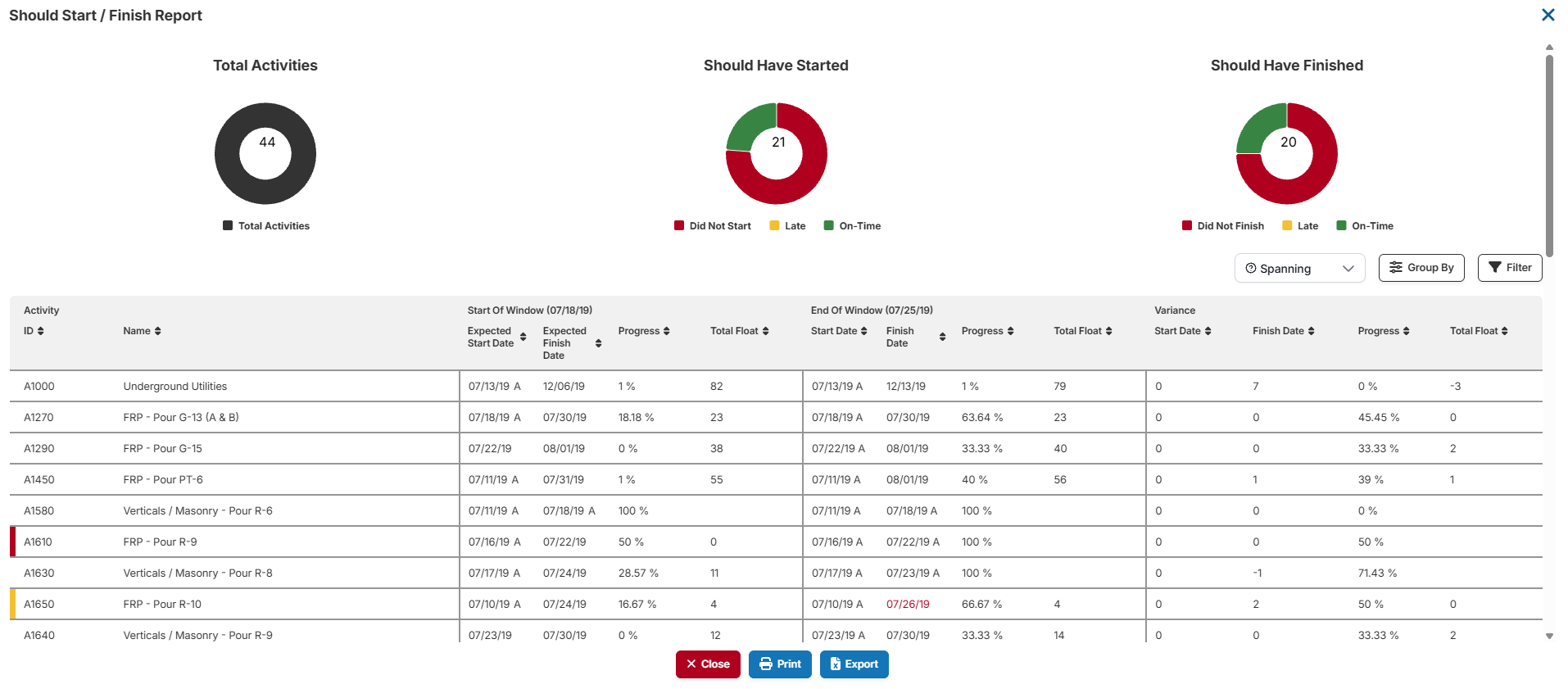
Before calculating, pull the following six values from the SmartPM report for the relevant reporting window. Make sure the Should Start / Should Finish report is set to Spanning.
|
SmartPM Field |
What it Means |
Where to Find |
|
Total Activities |
All activities in scope for the window |
Summary panel |
|
Did Not Start |
Activities that should have started but did not |
SS section |
|
Late Start |
Activities that started, but later than planned |
SS section |
|
Did Not Finish |
Activities that should have finished but did not |
SF section |
|
Late Finish |
Activities that finished, but later than planned |
SF section |
|
Double-Counted Activities |
Activities flagged in both SS and SF sections |
Overlap count |
Note: Double-counted activities appear in both the SS and SF missed buckets. Adding them back in the numerator corrects for that double subtraction.
- Open the project in SmartPM and navigate to the Should Start / Should Finish report.
- Set the report view to Spanning to capture all activities whose planned start or finish falls within the reporting window.
- Note the Total Activities count from the summary panel at the top of the report.
- Under the Should Have Started section, record the Did Not Start and Late Start counts.
- Under the Should Have Finished section, record the Did Not Finish and Late Finish counts.
- Identify any double-counted activities: these are flagged as "double red" or "yellow + red at window end" and appear in both the SS and SF sections. Record that count.
- Enter all six values into the formula in Step 2.
Step 2: Apply the Hit Rate Formula
|
Step |
Description |
Formula |
|
1 |
SS Missed |
Did Not Start + Late Start |
|
2 |
SF Missed |
Did Not Finish + Late Finish |
|
3 |
Total Missed |
SS Missed + SF Missed |
|
4 |
Unique Hits |
Total Activities − Total Missed |
|
5 |
Numerator |
Unique Hits + Double-Counted |
|
6 |
Hit Rate |
(Numerator ÷ Total Activities) × 100 |
The final result is expressed as a percentage (e.g., 74.3%). SmartPM rounds to one decimal place.
Example
The following example shows how the formula is applied.
Input values:
|
Field |
Value |
|
Total Activities |
200 |
|
Did Not Start |
18 |
|
Late Start |
7 |
|
Did Not Finish |
12 |
|
Late Finish |
5 |
|
Double-Counted Activities |
8 |
Calculation:
|
Step |
Description |
Formula |
Result |
|
1 |
SS Missed |
18 + 7 |
25 |
|
2 |
SF Missed |
12 + 5 |
17 |
|
3 |
Total Missed |
25 + 17 |
42 |
|
4 |
Unique Hits |
200 − 42 |
158 |
|
5 |
Numerator |
158 + 8 |
166 |
|
6 |
Hit Rate |
(166 ÷ 200) × 100 |
83.0% |
Out of 200 planned activities, 166 unique hits were recorded after correcting for double-counting.
Interpreting Your Hit Rate
|
Hit Rate |
Interpretation |
|
85%–100% |
Strong schedule execution |
|
70%–84% |
Moderate performance, room to improve |
|
Below 70% |
Significant schedule risk, needs attention |
Best Practices
- Choose a realistic Hit Rate Goal for each update window — not necessarily 100%.
- Monitor the hit rate across windows to detect trends of deviation.
- Drill down into missed activities using Window Start Accuracy and Window Finish Accuracy metrics to identify which tasks are late or didn't occur.
- Use the Should Have Started / Should Have Finished reports for root-cause analysis of delays.
Frequently Asked Questions
Why does double-counting happen? An activity that was supposed to both start and finish within the window will appear in both the SS and SF missed buckets if it misses. Without the correction, it would be penalized twice. The formula adds those activities back once in the numerator to reflect the true picture.
How do I find double-counted activities in SmartPM? Look for activities flagged as "double red" or "yellow + red at window end" in the SmartPM interface. These appear in both the SS and SF sections simultaneously.