Use Advanced Modeling in SmartPM to build “what-if” scenario analyses. A model combines one or more schedules with rules or “conditions” so you can compare alternative possible outcomes (e.g. different baselines, changes, or resource removals).
You may use advanced modeling to:
- Evaluate alternate baselines (e.g. a new baseline because of an official time extension or a schedule update that has significant pull-planning or re-sequencing)
- Measure percent complete with the removal of cost & resources
- Test the critical path if schedule changes would have occurred in an earlier updates or not at all
To create a model:
- Go to the Project Page by clicking the project from the Project List.
- Click Modeling from the top menu bar.
- Click + Model from the top right of the screen.
- Click Advanced Model.
- Enter a name and optional description, then click Next
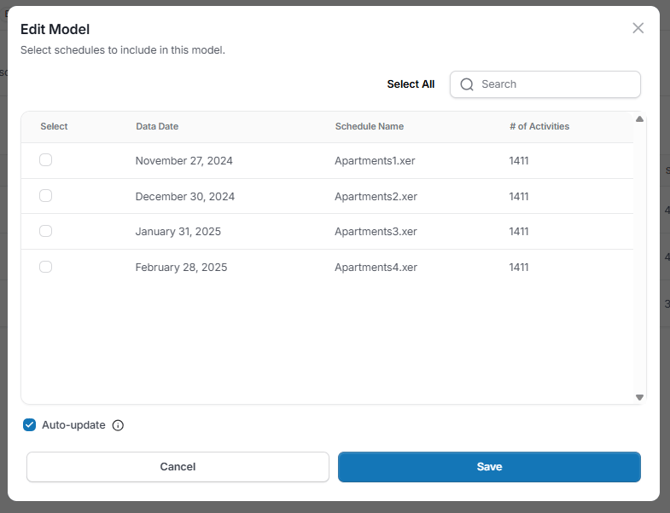
- Select the schedules to include in the model.
- Check or uncheck the Auto-Update box to decide if you want the model to be static or not, then click Next.
- Select one or more conditions/rules you want to apply (if applicable) and click Save
You’ll receive a notification once the analysis is complete.
Select the Model and milestones:
- Click on the project name from the Project List.
- From here, click Analysis from the top menu bar
- Then, click Milestones from the left menu. You will see a list of your Key Milestones for the selected project.
- To add a Milestone, click + Milestone on the top right.
- Click the radio button to the left of the Milestones you would like to track.You can search using the dropdown or search bar on the top right.
- Once all of your milestones are selected click Save.
- Newly added milestones will populate on the Milestones table.
Edit a Model:
If you would like to edit a model, the available updates are either adding or removing schedules, or checking or unchecking the Auto-Update option.