Global Navigation Menu
Use the Global Navigation Menu to quickly access different SmartPM features. The Global Navigation Menu can be accessed from any screen in SmartPM by clicking on the icons on the left hand side.
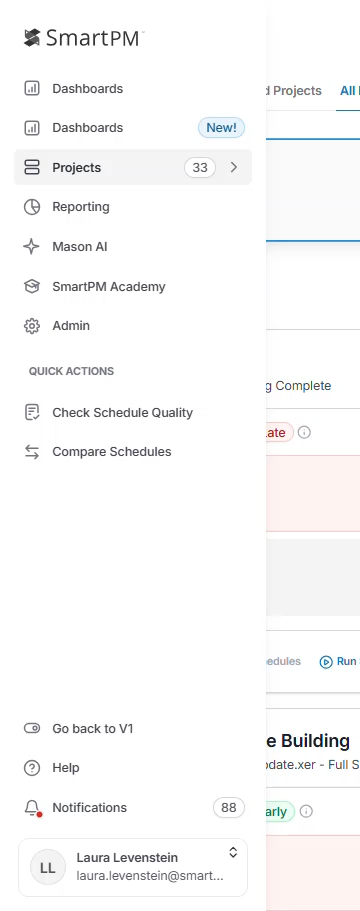
|
Dashboards |
Access the Executive Dashboard. |
|
Projects |
View all of your projects and high level metrics for each. |
|
Reporting |
Create and edit custom reports. Additionally, you can access subscriptions and create, manage, and edit subscriptions for your company. |
|
Mason AI |
Our AI assistant streamlines daily project workflows by letting you ask natural questions about your data and get instant, insightful responses, no manual searching required. |
|
Admin |
Access the Admin Dashboard where you can set up the following:
|
|
Check Schedule Quality |
This tool allows you to generate a quality report without having to upload a project and can be used an unlimited number of times. |
|
Compare Schedules |
Analyze differences between schedules and track changes between them. |
|
SmartPM Academy |
Access the SmartPM Academy to enroll in courses to strengthen your SmartPM and CPM skills. |