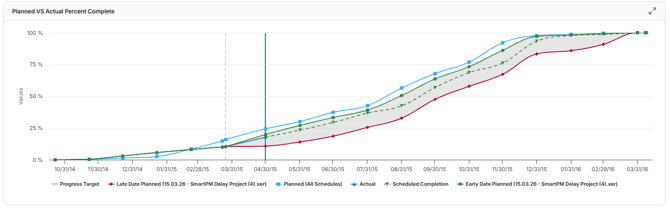
SmartPM uses Percent Complete to measure progress and compare what was planned versus what has actually occurred in your schedule. This metric plays a key role in assessing schedule health, forecasting completion, and tracking earned progress over time.
Planned Percent Complete: The percentage of work that should be complete as of the current data date, based on the baseline schedule.
Actual Percent Complete: The percentage of work that is actually complete, based on the most recent schedule update.
Overall Percent Complete:
The Overall Percent Complete represents a blended progress calculation that combines cost, resource, and duration metrics. This provides a comprehensive view of total project progress across all tracked dimensions.
Cost-Based Percent Complete:
SmartPM identifies all activities with cost associations and calculates progress using each activity’s Earned Cost Value.
Resource-Based Percent Complete:
For activities that include manhour or resource assignments, SmartPM measures progress using the Actual Units reported.
Duration-Based Percent Complete:
SmartPM evaluates all activities based on duration progress, measuring how much time has been earned relative to what was planned.
Final Calculation:
SmartPM calculates the Total Project Percent Complete by blending the Current Earned Cost, Resources, or Duration values across all activities
Plan vs Actual Progress Export:
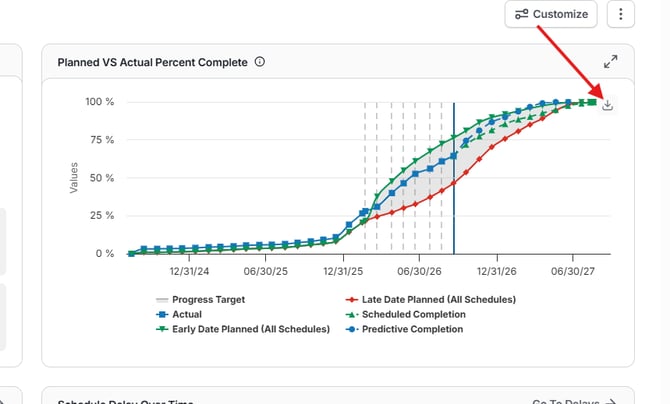
You are able to export the data behind the Planned vs. Actual chart on your project dashboard. A single export gives you:
- Chart data: The planned and actual progress values shown on the chart
- Activity details: The percent complete for each activity
Use the export to dig deeper into your progress data, share it with your team, or build your own reports, without recreating the numbers in Excel.
What's Included:
- A spreadsheet export from the download button on the plan-vs-actual chart
- A summary tab showing planned and actual percent complete at every data point, with overall totals
- An activity tab showing each activity's planned, actual and earned percentage as of the latest data date, with its progress basis
- Earned duration, earned units or earned budget, depending on the progress basis
- The export follows whichever progress model is selected, including custom models (for example, one that excludes resources)
Why It's Meaningful:
- It answers "how is percent complete calculated?" with the activity-level math, instead of a verbal walkthrough of the methodology
- A few users asked for this because it was an owner-requested item
- Project controls teams get a working file for their own reporting instead of transcribing values off a chart
Real-World Use Case:
- A PM whose overall percent looks behind can sort the activity tab to see which activities account for the gap between planned and actual
- A team running a custom progress model can verify, activity by activity, that the model behaves the way they configured it
- When an owner asks for backup on a reported percent complete, the team sends the percent complete breakdown
How P6 and SmartPM Calculate Percent Complete Differently
1. Core Calculation Approach
SPM
-
Percent Complete is based on actual work performed vs. total work (actual + remaining).
-
Typically reflects effort-based progress (e.g., hours or work units completed).
-
Formula conceptually aligns with:
-
PC = Work Completed / Total Work
-
P6 (and similar scheduling engines)
-
Percent Complete is based on the project time distribution around the data date.
- Relies on time-based segmentation of the schedule, not work performed.
- Progress is derived from how much of the schedule duration has elapsed relative to the data date.
2. Impact of Schedule Structure and Lag TimeBecause P6 is time-based:
- Large lag periods or uneven activity distribution can significantly skew Percent Complete.
- If activities are not aligned around the data date, the calculated progress may not reflect actual work performed.
- Lag time does not directly affect Percent Complete.
- Progress remains tied to actual effort completed, providing a more execution-focused view.
3. Behavior When Activities Exist on the Data Date
-
When activities span or fall on the data date:P6 ExampleActual duration = time from project start to data date
-
Remaining duration = time from data date to project end
-
Percent Complete is calculated as a proportion of time elapsed:
- Example: 35 / 130 = 26%
- Result: 40%
4. Behavior When No Activities Fall on the Data DateWhen activities are shifted away from the data date:
- P6 BehaviorProgress may increase unexpectedly even when less work is completed.
- This occurs because P6 recalculates based on how activities are distributed around the data date.
- Percent Complete may increase despite reduced actual progress.
5. Key Takeaway
- SPM = Work-based progress (effort-driven, reflects actual execution)
- P6 = Time-based progress (schedule/data-date driven, sensitive to activity placement)
- High lag time
- Uneven activity distribution
- Activities not aligned to the data date