The Reporting tab in SmartPM turns your project schedule data into clear, actionable insights for different audiences. Users can generate updates ranging from quick status summaries to in-depth performance analyses, with the option to automate delivery.
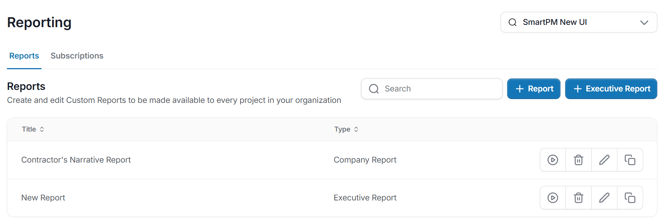
There are four main ways to start a report:
- Pre-Built Reports – Ready-to-use formats that are automatically generated and cannot be customized. Best for quick, consistent updates.
- Project-Level Reports – Custom reports designed for a single project, including project-oriented templates. Often used to meet a specific client’s reporting requirements and can be scheduled to send automatically after each update.
- Company-Level Reports – Standardized templates applied across all projects, often tailored by role. Helps enforce consistency and ensure stakeholders get the same information every cycle.
- Custom Reports – Fully configurable reports where you can start from scratch or use one of eight built-in templates. You can mix and match any SmartPM metric, visual, or table, and set up automation.
You can now run a report directly from the Reports page without opening a project first.
Steps:
- Go to Reports > Company Reports.
- Click the Play (▶) icon next to the report you want to run.
- Select the project you want the report for.
- Select the model, milestone, and file for the report.
- Click Execute Report.
- A new tab opens with the report for that project.
Note: Each report run opens in its own tab. If you need reports for multiple projects, run them one at a time.
Subscriptions:
Executive Dashboard Subscriptions in SmartPM automate the delivery of high-level project insights via email, keeping stakeholders informed without needing to log in. These reports summarize schedule performance, risk exposure, project health, and portfolio trends—ideal for executives and project leaders. Subscriptions can be customized by selecting specific projects, reports, recipients, and delivery frequency, ensuring consistent, transparent reporting that supports proactive decision-making.