Schedules serves as the central repository for all project schedule files, allowing teams to view, upload, download, and manage schedules in one place. It ensures all stakeholders have access to the same, unaltered source files for consistent analysis and collaboration.
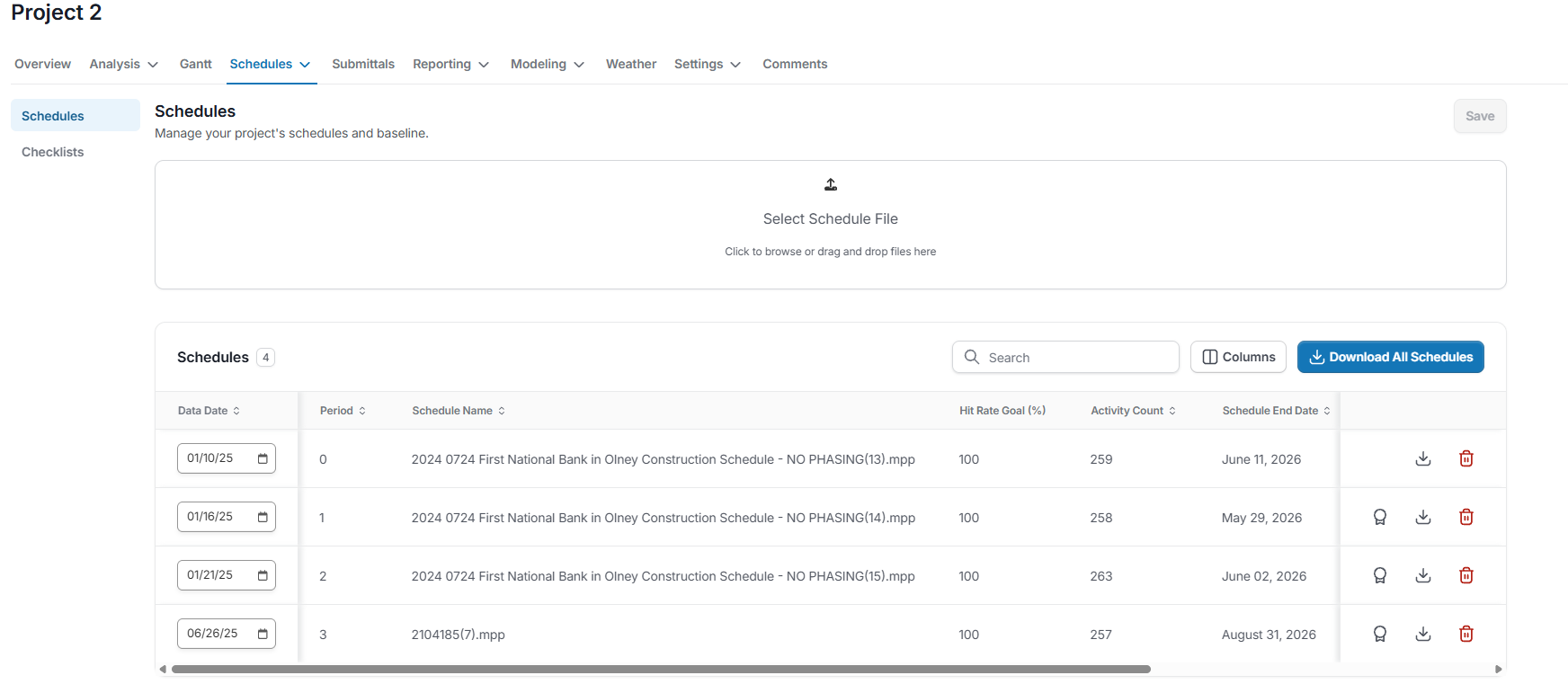
Key Features:
- Schedule Repository: Stores every uploaded schedule file (.xer, .mpp, etc.) in sequential order by update period.
- Sortable Table: Sort schedules by any column—Period, Data Date, Schedule Name, Hit Rate Goal, Activity Count, Schedule End Date, or Rebaseline status.
- Upload Box: Drag-and-drop or browse to upload new schedules directly into the repository.
- Rebaseline Flag: Mark a specific update as the baseline reference for performance comparisons.
- Download Option: Retrieve the original schedule file exactly as uploaded—SmartPM’s modeling and analysis do not alter the stored file.
- Download All Schedules: Easily download all of your project schedules in one click
- Delete Option: Remove a schedule entirely from the repository (and from all associated analyses).
- Activity Count: Shows the total number of activities in each schedule, which can indicate changes in project scope, detail, or breakdown from one update to the next.
- Hit Rate Goal: Sets the target percentage of activities expected to start or finish on time, providing a benchmark for progress and delay analysis in later reporting.
By keeping every schedule version in one shared location and preserving the integrity of the original files, teams can maintain a clear, auditable record of project updates, critical for accurate delay analysis, performance tracking, and contractual compliance.
See Schedule Management for more information on how to engage with the Schedules Tab.