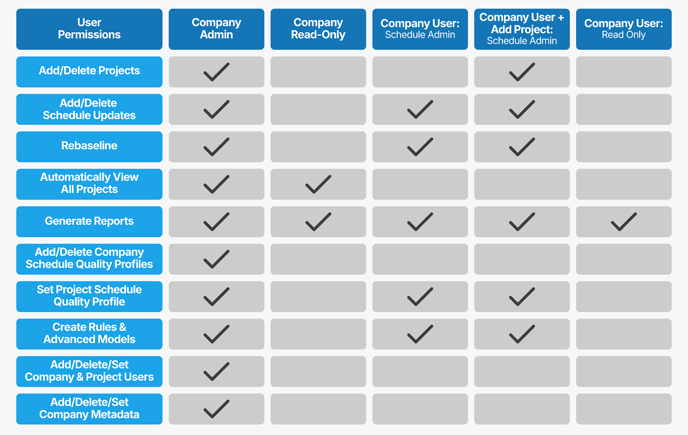
Before granting project-level permissions in SmartPM, it’s important to assign the correct company-level role based on each user’s responsibilities. This ensures users have the appropriate access across the organization and within individual projects.
Be sure to assign the company role that aligns with the user’s responsibilities before adding project permissions.
User Types at the Company Level:
- Company Admin: Full privileges to create projects, upload schedules, access admin settings, etc.
- Company Read-Only: Can view all projects but not edit schedules or manage projects.
- Company User: Can only access projects they are assigned to. Permissions depend on project-level role.
- Company User + Add Project: Can access projects they are assigned to plus create new projects.
Project-Level User Roles:
- Schedule Admin: Full control over project schedules, modifications, etc.
- Read-Only User: Can view project data and reports but cannot change them.