SmartPM employs the Windows Half-Step methodology to perform windows style delay analysis, providing detailed insights into project delays and accelerations.
How It Works
SmartPM compares two schedule updates that define a period or “window” of the project, assessing the impact of reported progress according to the end of the window schedule against the plan of the start of the window schedule. This approach allows for the calculation of:
- Experienced Critical Path Delay (In-Period Delay): Measurable impact to the project’s end date due to deficient actual progress on driving critical path activities
- Actual Acceleration (In-Period Gains): Measures real progress achieved that improves the overall end date, distinguishing it from planned acceleration.
- Planned Impact: Planned impacts represent intentional changes made to the remaining planned work in a project that impacts the end date. These adjustments can either accelerate the schedule to finish earlier or extend it to account for additional time needed for work.
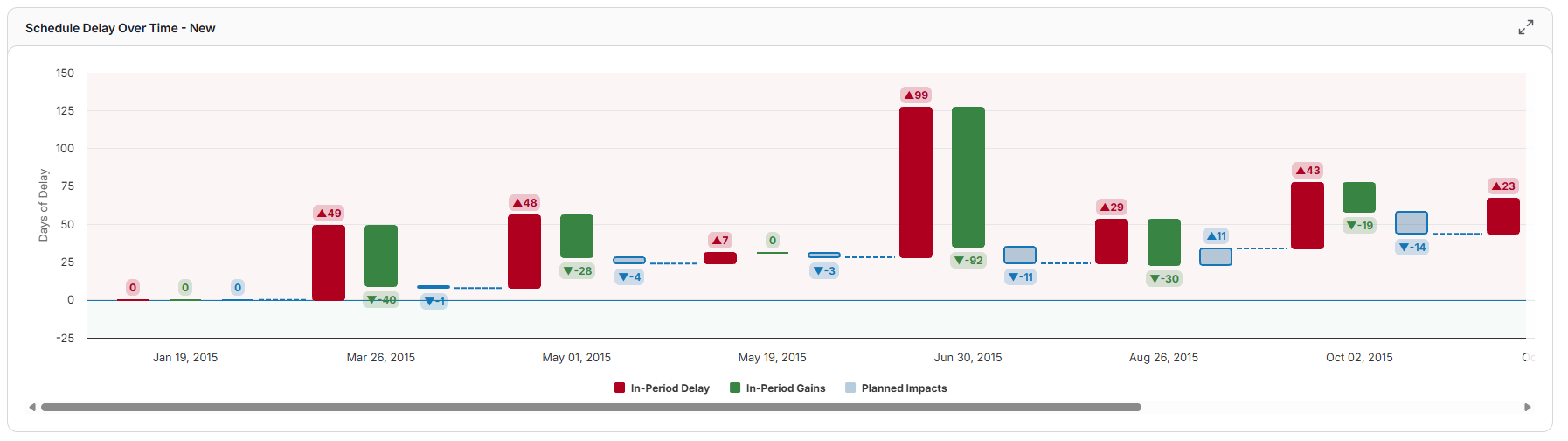
Delays and accelerations can both occur within the same activity. For instance, if you are delayed to start an activity, but once the activity is actually started it finishes in less time than its planned duration.
Best Practices
- Regularly Review Delay Tables: Consistent analysis helps in identifying trends and potential issues early.
- Interpret Results in Context: Consider the broader project context when analyzing delays and accelerations.
- Utilize Gantt Charts for Visualization: Gantt charts provide a visual representation of delays and can aid in understanding the sequence of events.